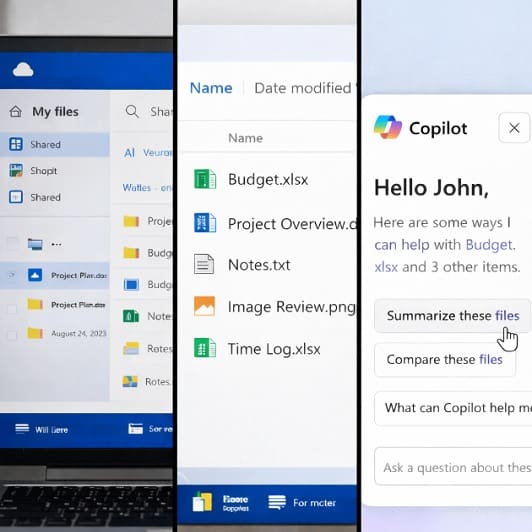
In today’s digital workplace, sharing files quickly and securely is essential. Especially when sending documents to clients or working with external partners, businesses need a solution that keeps information accessible without compromising security. This is where Microsoft 365’s secure file sharing comes into play.
Microsoft 365 provides a powerful and secure way to share files through tools such as OneDrive and SharePoint. These platforms allow teams to collaborate efficiently while ensuring sensitive data remains protected.
At Inventas we help businesses implement and manage Microsoft 365 solutions that enable secure collaboration without unnecessary risk. Here’s how Microsoft 365 secure file sharing works and how your organisation can easily use it.
Why Secure File Sharing Matters for Businesses
Many organisations still rely on outdated methods of sharing documents, such as email attachments or unsecured file transfer tools. These approaches can create several risks:
- Sensitive information may be sent to the wrong person or stored on unsecured devices
- Files can be downloaded, copied, or forwarded without control
- Large files may exceed email size limits
- Increased vulnerability to cyber threats
- Multiple versions of the same document can cause confusion
Secure file sharing ensures that your data is protected while still allowing teams and clients to collaborate easily.
Microsoft 365 solves these issues by offering centralised, permission-based file sharing with built-in security controls.
How Microsoft 365 Makes Client File Sharing More Secure
Microsoft 365 enables secure file sharing through tools such as OneDrive and SharePoint. Instead of attaching documents to an email, files are stored securely in the cloud and shared using controlled access links.
This approach allows you to:
- Decide exactly who can access the file
- Control whether clients can view or edit the document
- Prevent files from being downloaded or shared further
- Revoke access at any time
This means you retain control over your documents even after they have been shared.
Sharing Files Securely Using OneDrive
OneDrive for Business is one of the easiest ways to share documents securely with clients.
Instead of sending a file directly, you can generate a secure link and send it via email. When creating the link, you can choose several security options, including:
View-only access
Clients can view the file but cannot edit it.
Password protection
Require a password before the file can be opened, which you can supply the client with separately.
Expiry dates
Set links to automatically expire after a certain time.
Restricted access
Limit access to specific email addresses.
These features help ensure that only the intended recipient can view the information.
Controlling Access to Sensitive Documents
For documents that contain confidential information, Microsoft 365 allows businesses to apply additional protections.
You can restrict actions such as:
- Downloading the file
- Printing the document
- Forwarding the sharing link
- Editing the original file
Administrators can also track access to documents, allowing businesses to see when files were opened and by whom.
This level of visibility is particularly useful when sharing contracts, legal documents, or financial reports.
Secure Collaboration with Clients
In some situations, clients may need to collaborate on documents rather than simply view them.
With tools like SharePoint and Microsoft Teams, clients can:
- Review documents in real time
- Leave comments or feedback
- Edit files where permission is granted
- Access the most up-to-date version
Because the file remains stored securely in Microsoft 365, there is no need to send updated versions back and forth.
Best Practices When Sharing Files with Clients
To maximise security when sharing documents externally, businesses should follow a few simple best practices.
Use secure links rather than attachments
This keeps documents protected within Microsoft 365.
Restrict access to specific recipients
Avoid public sharing links where possible.
Enable link expiry dates
Prevent long-term access to sensitive files.
Use password protection for confidential documents
Adds an extra layer of security.
Enable multi-factor authentication for staff accounts
Protects your Microsoft 365 environment from unauthorised access.
These steps help ensure that client information remains secure.
How Inventas Helps Businesses Share Files Securely with Microsoft 365
Many businesses use Microsoft 365 but are not fully aware of the security features available for file sharing. Without proper configuration, organisations may unintentionally expose sensitive data.
At Inventas, we help businesses across Surrey and the South East:
- Configure secure file sharing policies in Microsoft 365
- Set up OneDrive and SharePoint correctly
- Implement security features such as MFA and access controls
- Train teams on safe document sharing practices
- Provide ongoing IT support and cybersecurity guidance
Our goal is to help businesses collaborate with clients confidently while keeping their information protected.
Share Fires Securely with Microsoft 365
Microsoft 365 provides businesses with a secure and flexible way to share documents with clients. By replacing email attachments with controlled sharing links, organisations can improve security, maintain compliance and protect sensitive information.
If you want to ensure your business is sharing files securely with clients, Inventas can help you implement and manage Microsoft 365 the right way.
Get in touch with our team to learn how we can support your business with secure IT solutions.